MP3 Lyrics Script
• 11 min read
Jan Montag


Hallo Freunde, wie ihr wisst, nein, wahrscheinlich weiß das keiner und ich überschätze meine Fähigkeiten und vor allem meine Berühmtheit sehr, programmiere ich einen kleinen Terminal Navidrome Client. Aber der Reihe nach: Ich habe irgendwann entschieden, weniger Spotify zu nutzen sondern meine alten MP3s zu reaktivieren, die ich kurz zuvor auf einer alten Festplatte wiedergefunden habe. Und dann entdeckte ich die großartige Software Navidrome, welche die heimischen MP3s an Clients auf dem Smartphone oder sogar per Webinterface, streamen kann. Ganz wie Spotify. Und seitdem läuft mein MP3 Player ständig und ich suhle mich in der Erinnerung der alten Musik bis ca. 2010 oder so ähnlich, als MP3 Sammlungen noch ein Ding waren.
 Jan Montag
Und weil ich ein großer Freund von Terminal User Interfaces (TUI) bin, habe ich als persönliches Projekt die Software TerminalDrome gestartet. Das ist ein Terminal Interface für Navidrome. Ich kann also fast alle Funktionen mit dem Terminal steuern und brauche zum MP3-Hören keinen Webbrowser oder eine andere App. Das funktioniert unter Linux sogar komplett ohne grafische Oberfläche. So sieht das dann aus:
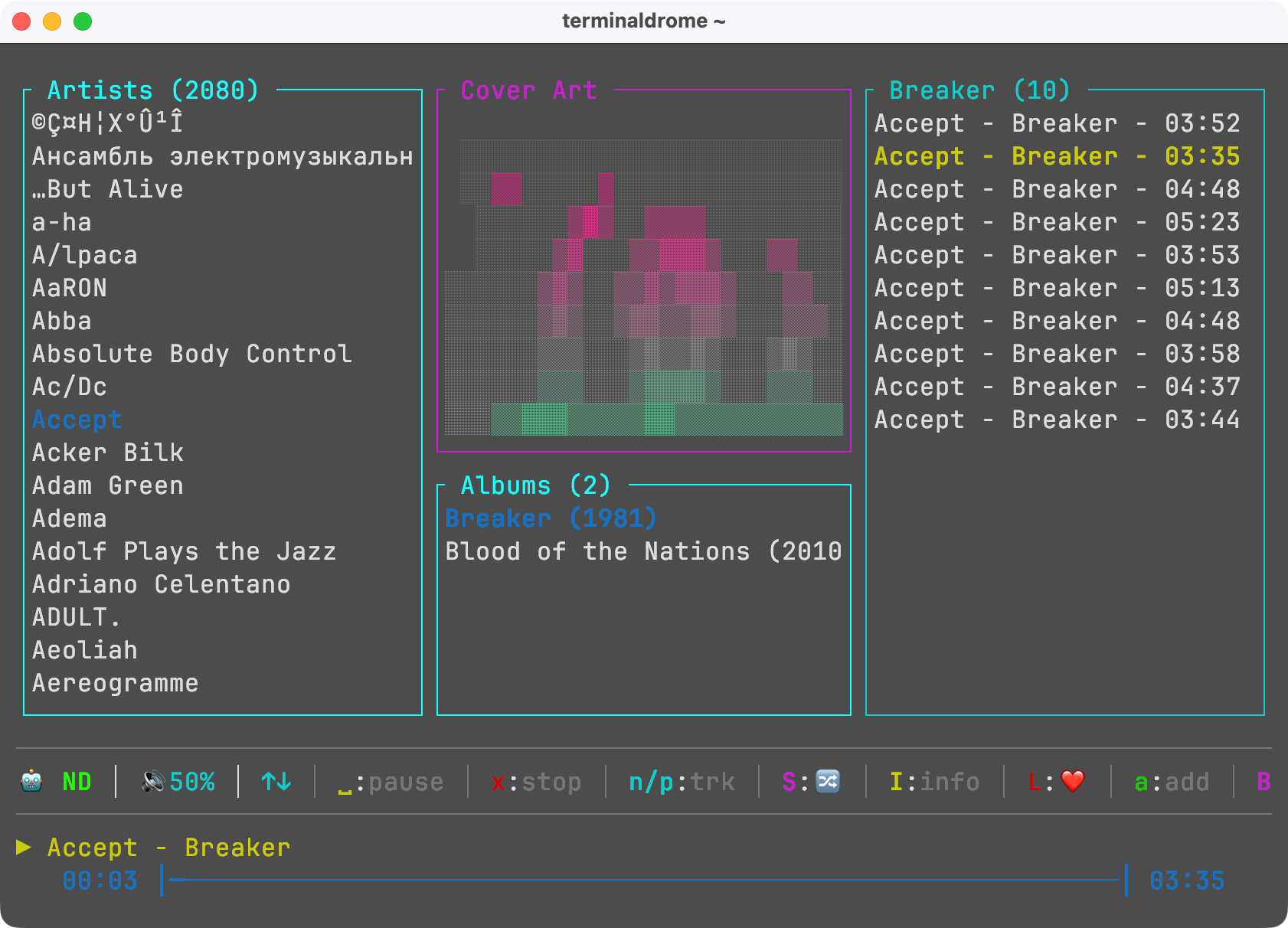
Hier könnt ihr mehr über TerminalDrome erfahren, ich habe ihm eine eigene Domain für den Projektfortschritt spendiert.
 Jan Montag
Und im Zuge dessen habe ich mich auch mit meiner MP3-Library auseinander gesetzt. MP3s habe ich damals mit iTunes getagged, beim Übertragen meiner legalen CDs in mein Archiv. Aber da sind doch immer mal hin und wieder ein paar Metadaten nicht übernommen worden oder waren schlicht falsch und ich musste mich damit beschäftigen, wie man sein Musik-Archiv ein wenig aufräumen kann. Beets ist da ein heißer Kandidat für große Archive, Picard für kleine und einzelne Dinge. Und ich erzähle das nur, weil es tatsächlich einiges an Aufwand hat, bis die eigene Datengrundlage so weit ist, dass man wirklich ein eigenes Spotify betreibt.
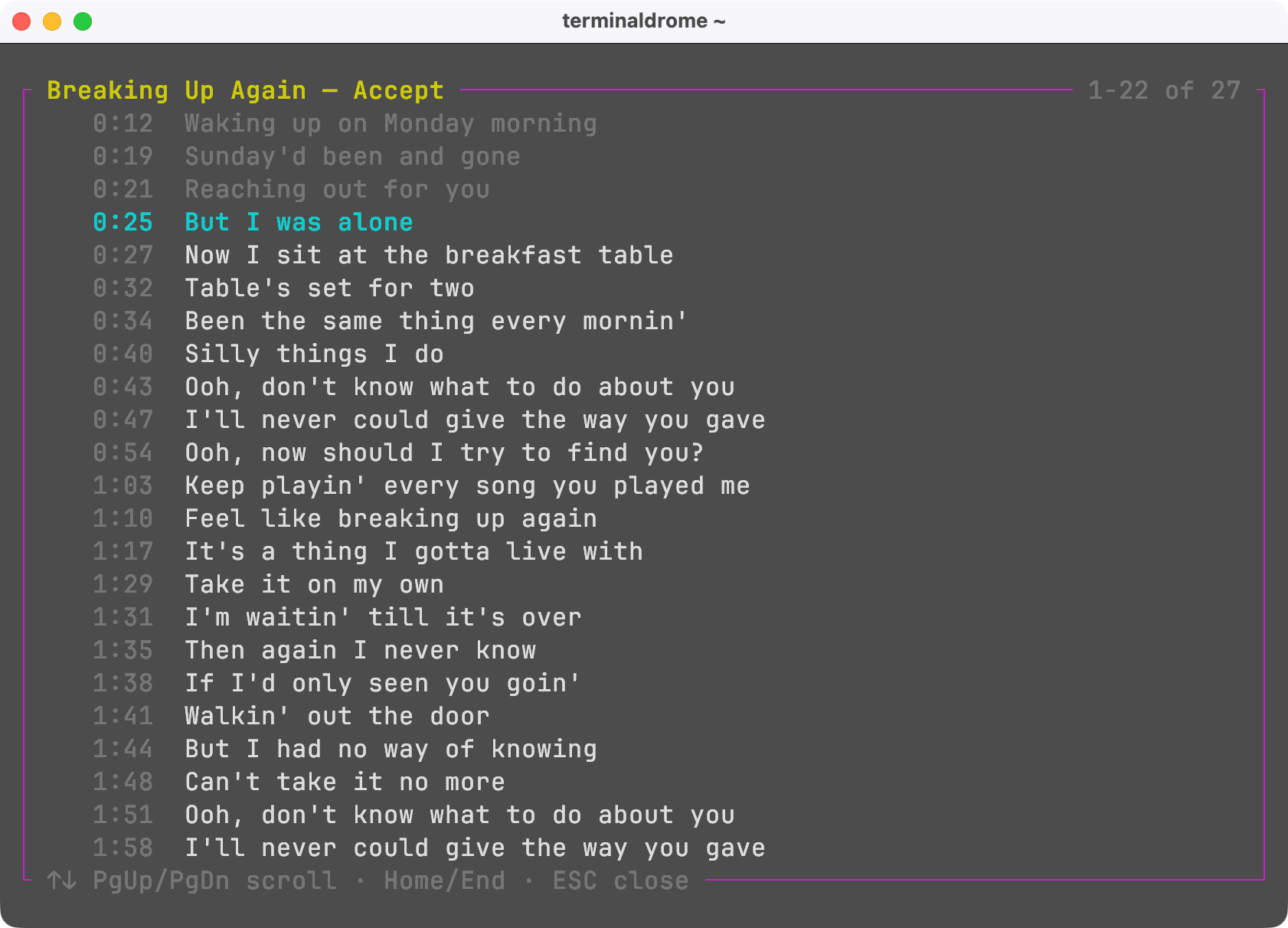
Als ich mich dann mit der weiteren Entwicklung von TerminalDrome auseinander setzte und nach und nach verschiedene Features einbaute, wieder aus oder ganz kaputt gemacht habe, bestand der Wunsch, Liedtexte anzeigen zu können. Die Funktion technisch nachzurüsten war dabei gar nicht so schwer, aber Lyrics zu haben dagegen sehr. Entweder stecken sie als Metadaten schon in der Musikdatei, oder man speichert sie als sogenannte extra Files neben den Musikdateien im gleichen Ordner. Navidrome kann dann anhand dieser Files passend zum aktuellen Song die Texte darstellen, so wie das bei Spotify auch klappt. Wenn der Song dann auch noch die Abspielzeit beinhaltet, kann Navidrome sogar passend zum aktuellen Songfortschritt wie bei Karaoke die passende Songzeile darstellen.
Allerdings ist das Webinterface von Navidrome derzeit kaputt und wird vollständig neu geschrieben, aber das interessiert meinen kleines TerminalDrome ja nicht. So sieht das dann übrigens aus, wenn man einen Song hat, bei dem der Liedtext im passenden Format und mit Zeitstempel vorliegt:
Ich habe mich an dieser Stelle gefragt, wie ich meine MP3-Sammlung mit entsprechenden Liedtexten ausstatten könnte. Möglichst automatisiert. Und siehe es, es gibt eine Website, die sich genau darauf spezialisiert hat, sie nennt sich lrclib.net. Das ist ein freies Archiv von Songtexten mit einer API die man abfragen kann. Und dann habe ich ein kleines Python-Script geschrieben, was ich euch zur Verfügung stellen möchte. Es geht eure Songs auf der Festplatte durch, fragt lrclib ob es passenden Text gibt und legt ihn ab. Und wenn das Script durchgelaufen ist, habt ihr im besten Fall für viele eurer MP3 Dateien die passenden Lyric-Files zur Verfügung.
Funktionsweise:
# Testlauf um zu sehen, was gefunden und geladen werden würde:
./lrclib_fetch.py /music --dry-run --limit 20

# Ein Album in einem Ordner prüfen und die Lyrics laden
./lrclib_fetch.py "/music/Radiohead/Pablo_Honey"

# Durchsuche mein gesamtes Musikarchiv nach Liedtexten und speichere:
./lrclib_fetch.py /music --delay 1.0
Download
Hier könnt ihr euch das Script herunter laden:
wget https://herrmontag.de/content/files/2026/10/lrclib_fetch.py
Durch eine so großartige Seite wie lrclib konnte ich meine kleine Sammlung mit entsprechenden Liedtexten ausstatten und freue mich von Zeit zu Zeit, wenn ich darin stöbern kann. Es ist schon verblüffend, wie oft ich "misheard Lyrics" in meinem Kopf habe.
Oder ihr schaut euch das Script hier an:
janmontag@raspberrypi:~/scripts/mp3$ cat lrclib_fetch.py

#!/usr/bin/env python3
"""
Fetch lyrics from LRCLIB and write .lrc sidecar files next to your audio,
so Navidrome can serve them through the Subsonic API.

lrclib.net is a free, open lyrics library with a public API: no key, no
registration. Nothing is scraped and nothing is written back to it.

Navidrome looks for a file with the same name as the track but a .lrc
extension (song.mp3 -> song.lrc), controlled by its LyricsPriority option.

Usage
-----
    # dry run: see what would be fetched, touch nothing
    ./lrclib_fetch.py /music --dry-run --limit 20

    # the real thing on one album
    ./lrclib_fetch.py "/music/Radiohead/Pablo Honey"

    # whole library, slow and polite
    ./lrclib_fetch.py /music --delay 1.0

Requires Python 3.9+. For tags it uses mutagen if importable, otherwise
ffprobe (part of ffmpeg). At least one of the two must be present.
"""

import argparse
import json
import re
import shutil
import subprocess
import sys
import time
import urllib.error
import urllib.parse
import urllib.request
from pathlib import Path

AUDIO_EXT = {
    ".mp3", ".flac", ".m4a", ".mp4", ".ogg", ".opus", ".oga", ".aac",
    ".wma", ".wav", ".aiff", ".aif", ".ape", ".wv", ".mpc", ".dsf", ".dff",
}
LRC_EXT = ".lrc"
API = "https://lrclib.net/api"
# LRCLIB asks clients to identify themselves and keep requests modest.
USER_AGENT = "navidrome-lrclib-fetch/1.0 (self-hosted lyrics fetcher)"

# LRCLIB parks unreleased/withheld tracks under this placeholder instead of
# leaving the record empty. Writing it out would be worse than writing nothing.
PLACEHOLDER = re.compile(
    r"^\s*this song is (unavailable|not available)", re.IGNORECASE
)


class Stats:
    def __init__(self):
        self.counts = {}
        self.files = []

    def bump(self, key, n=1):
        self.counts[key] = self.counts.get(key, 0) + n

    def record(self, path, result, note=""):
        # Absolute, so the report resumes no matter how the script was
        # invoked next time.
        try:
            resolved = str(path.resolve())
        except OSError:
            resolved = str(path)
        self.files.append({"file": resolved, "result": result, "note": note})


# ── tag reading ────────────────────────────────────────────────────────────

def _first(value):
    """Tags come back as str, list, or None depending on reader and format."""
    if value is None:
        return ""
    if isinstance(value, (list, tuple)):
        for item in value:
            if item:
                return _first(item)
        return ""
    return str(value).strip()


# Reasons that mean the lookup never completed, as opposed to the server
# having answered. A definitive answer is worth remembering across runs; a
# failed request is not.
TRANSIENT_REASONS = (
    "gave up after retries",
    "timed out",
    "timeout",
    "unreachable",
    "urlerror",
    "http 5",
    "server error",
    "rate limited",
    "unreadable",
    "no tag reader",
)


def is_definitive(reason):
    """Whether repeating the request could plausibly give a different answer."""
    text = (reason or "").lower()
    return not any(marker in text for marker in TRANSIENT_REASONS)


def _reader_available(prefer="auto"):
    """Whether at least one tag reader can actually be used."""
    if prefer in ("auto", "mutagen"):
        try:
            import mutagen  # noqa: F401
            return True
        except ImportError:
            pass
    if prefer in ("auto", "ffprobe"):
        return shutil.which("ffprobe") is not None
    return False


def _read_with_mutagen(path):
    import mutagen  # noqa: F401  (import failure is handled by the caller)

    audio = mutagen.File(str(path), easy=True)
    if audio is None:
        return None
    tags = getattr(audio, "tags", None) or {}
    duration = getattr(getattr(audio, "info", None), "length", None)
    return {
        "title": _first(tags.get("title")),
        "artist": _first(tags.get("artist")),
        "album": _first(tags.get("album")),
        "duration": round(float(duration)) if duration else 0,
        "embedded_lyrics": _first(tags.get("lyrics")),
        "source": "mutagen",
    }


def _read_with_ffprobe(path):
    import json as _json

    out = subprocess.run(
        ["ffprobe", "-v", "quiet", "-print_format", "json",
         "-show_format", str(path)],
        capture_output=True, text=True, check=True,
    ).stdout
    fmt = _json.loads(out).get("format", {})
    tags = fmt.get("tags", {}) or {}

    def tag(*names):
        for name in names:
            if name in tags:
                return _first(tags[name])
        return ""

    try:
        duration = round(float(fmt.get("duration", 0)))
    except (TypeError, ValueError):
        duration = 0

    return {
        "title": tag("title", "TITLE"),
        "artist": tag("artist", "ARTIST"),
        "album": tag("album", "ALBUM"),
        "duration": duration,
        "embedded_lyrics": tag("lyrics", "LYRICS", "unsyncedlyrics"),
        "source": "ffprobe",
    }


def read_tags(path, prefer):
    """Return tag dict, or None if neither reader is available."""
    readers = []
    if prefer in ("auto", "mutagen"):
        readers.append(_read_with_mutagen)
    if prefer in ("auto", "ffprobe"):
        readers.append(_read_with_ffprobe)
    for reader in readers:
        try:
            return reader(path)
        except ImportError:
            continue
        except Exception as exc:  # corrupt file, unsupported codec
            return {"error": f"{reader.__name__}: {exc}"}
    return None


# ── LRCLIB ─────────────────────────────────────────────────────────────────

def fetch_lyrics(title, artist, album, duration, retries=5, timeout=25):
    """
    Look a track up by its full signature. Returns (text, kind) or (None, reason).

    /api/get is used rather than /api/get-cached because the cached-only
    endpoint misses tracks that are not in LRCLIB's own index yet, and it is
    much faster since it never reaches out to upstream sources.
    """
    if not (title and artist):
        return None, "missing title or artist"

    params = {"track_name": title, "artist_name": artist}
    if album:
        params["album_name"] = album
    if duration:
        params["duration"] = duration
    url = f"{API}/get?{urllib.parse.urlencode(params)}"

    for attempt in range(retries):
        try:
            req = urllib.request.Request(url, headers={"User-Agent": USER_AGENT})
            with urllib.request.urlopen(req, timeout=timeout) as resp:
                record = json.loads(resp.read().decode("utf-8"))
        except urllib.error.HTTPError as exc:
            if exc.code == 404:
                return None, "no match in LRCLIB"
            if exc.code == 429 or exc.code >= 500:
                # A 503 usually means LRCLIB could not reach its own upstream
                # source, so it is worth waiting longer than a rate limit is.
                if exc.code == 429:
                    wait = 2 ** attempt
                    why = "rate limited"
                else:
                    wait = 2 ** (attempt + 1)
                    why = "server error"
                # The server may name its own cooldown; it knows better
                # than this script does.
                try:
                    wait = max(wait, int(exc.headers.get("Retry-After", 0)))
                except (TypeError, ValueError, AttributeError):
                    pass
                print(f"    LRCLIB {why} ({exc.code}), waiting {wait}s",
                      file=sys.stderr)
                time.sleep(wait)
                continue
            return None, f"HTTP {exc.code}"
        except (urllib.error.URLError, TimeoutError, json.JSONDecodeError) as exc:
            wait = 2 ** attempt
            print(f"    {exc}, retry in {wait}s", file=sys.stderr)
            time.sleep(wait)
            continue

        if record.get("instrumental"):
            return None, "marked instrumental"
        synced = (record.get("syncedLyrics") or "").strip()
        plain = (record.get("plainLyrics") or "").strip()
        for text, kind in ((synced, "synced"), (plain, "plain")):
            if text and not PLACEHOLDER.match(text):
                return text, kind
        return None, "record has no usable lyrics"

    return None, "gave up after retries"


# ── main ───────────────────────────────────────────────────────────────────

def main():
    ap = argparse.ArgumentParser(
        description="Fetch lyrics from LRCLIB into .lrc sidecar files."
    )
    ap.add_argument("path", help="music directory to walk")
    ap.add_argument("--limit", type=int, default=0,
                    help="stop after N files (0 = no limit)")
    ap.add_argument("--delay", type=float, default=0.5,
                    help="seconds between requests (default 0.5)")
    ap.add_argument("--dry-run", action="store_true",
                    help="report what would happen, write nothing")
    ap.add_argument("--force", action="store_true",
                    help="overwrite existing .lrc files")
    ap.add_argument("--report", default="lrclib-report.json",
                    help="where to write the JSON report")
    ap.add_argument("--retries", type=int, default=5, metavar="N",
                    help="attempts per track when LRCLIB errors out (default 5)")
    ap.add_argument("--reader", choices=["auto", "mutagen", "ffprobe"],
                    default="auto", help="which tag reader to use")
    ap.add_argument("--quiet", action="store_true", help="only print the summary")
    args = ap.parse_args()

    root = Path(args.path).expanduser()
    if not root.is_dir():
        sys.exit(f"not a directory: {root}")

    # Fail once, loudly, instead of repeating the same message for every
    # track in the folder. Both readers are optional, but at least one has to
    # exist or nothing can be looked up.
    if not _reader_available(args.reader):
        print(
            "error: no tag reader found.\n"
            "       Debian/Ubuntu:  sudo apt install python3-mutagen\n"
            "       or:             sudo apt install ffmpeg\n"
            "       Already installed? It may not be on PATH.",
            file=sys.stderr,
        )
        return 2

    stats = Stats()

    def say(*parts):
        if not args.quiet:
            print(*parts)

    candidates = sorted(
        p for p in root.rglob("*")
        if p.is_file() and p.suffix.lower() in AUDIO_EXT
    )
    if args.limit:
        candidates = candidates[: args.limit]
    stats.bump("total", len(candidates))

    say(f"{len(candidates)} audio file(s) under {root}")
    if not candidates:
        say("nothing to do.")
        return 0

    previous = {}
    report_path = Path(args.report)
    if report_path.exists() and not args.force:
        try:
            for entry in json.loads(report_path.read_text()).get("files", []):
                # Keys are normalised to absolute paths, so a report written
                # with a relative invocation still resumes correctly.
                try:
                    key = str(Path(entry["file"]).resolve())
                except (OSError, KeyError, TypeError):
                    continue
                previous[key] = entry
            say(f"resuming: {len(previous)} file(s) already in {report_path}")
        except (OSError, ValueError):
            pass

    print()
    for index, audio in enumerate(candidates, 1):
        target = audio.with_suffix(LRC_EXT)
        prefix = f"[{index}/{len(candidates)}] {audio.name}"

        if target.exists() and not args.force:
            stats.bump("skipped, .lrc present")
            continue

        key = str(audio.resolve())
        if key in previous and not args.force and args.dry_run is False:
            reason = previous[key].get("note", "")
            if is_definitive(reason):
                stats.bump("skipped, already attempted")
                continue
            # The server never actually gave an answer last time, so asking
            # again is the only way to find out. Treating a dropped request
            # as a result would silently lose the lyric for good.
            stats.bump("retrying after earlier failure")

        tags = read_tags(audio, args.reader)
        if tags is None:
            stats.bump("error, no tag reader")
            stats.record(audio, "error", "neither mutagen nor ffprobe available")
            say(f"{prefix}\n    no tag reader — install mutagen or ffmpeg")
            return 1
        if "error" in tags:
            stats.bump("error, unreadable")
            stats.record(audio, "error", tags["error"])
            say(f"{prefix}\n    {tags['error']}")
            continue

        if tags["embedded_lyrics"]:
            stats.bump("skipped, lyrics already embedded")
            stats.record(audio, "skipped", "embedded lyrics present")
            say(f"{prefix}\n    already has embedded lyrics")
            continue

        say(f"{prefix}\n    {tags['source']}: "
            f"{tags['artist']} — {tags['title']} [{tags['duration']}s, "
            f"{tags['album'] or 'no album'}]")

        if not (tags["title"] and tags["artist"]):
            stats.bump("skipped, no title or artist tag")
            stats.record(audio, "skipped", "no title or artist tag")
            say("    no title or artist tag — LRCLIB needs both, skipping")
            continue

        if args.dry_run:
            stats.bump("would fetch")
            stats.record(audio, "dry-run", "not fetched (dry run)")
            continue

        text, kind = fetch_lyrics(
            tags["title"], tags["artist"], tags["album"], tags["duration"],
            retries=args.retries,
        )

        if text is None:
            stats.bump(f"no lyrics ({kind})")
            stats.record(audio, "no-lyrics", kind)
            say(f"    -> {kind}")
        else:
            target.write_text(text + "\n", encoding="utf-8")
            stats.bump(f"written ({kind})")
            stats.record(audio, "written", f"{kind}, {len(text)} chars")
            say(f"    -> {kind}, {len(text)} chars -> {target.name}")

        if args.delay:
            time.sleep(args.delay)

        if index % 25 == 0:
            Path(args.report).write_text(json.dumps(
                {"files": stats.files}, indent=2), encoding="utf-8")

    Path(args.report).write_text(json.dumps({
        "root": str(root),
        "dry_run": args.dry_run,
        "counts": stats.counts,
        "files": stats.files,
    }, indent=2), encoding="utf-8")

    print("\n── summary " + "─" * 50)
    for key in sorted(stats.counts, key=lambda k: -stats.counts[k]):
        print(f"  {stats.counts[key]:>6}  {key}")
    print(f"\nreport: {args.report}")
    return 0


if __name__ == "__main__":
    sys.exit(main())
Hier könnt ihr euch die Datei herunter laden (oder wget auf eurem Server: wget https://herrmontag.de/content/files/2026/10/lrclib_fetch.py
ausführen und das Script herunter laden:
💬 Webmentions & Kommentare
Webmentions
Noch keine Webmentions.
🔥 Beliebteste Artikel
- Lade beliebteste Artikel…